How React Renders Components: A Deep Dive into Fiber
React provides a convenient API for declaratively defining components that can be rendered to the DOM. This allows developers to focus on the structure and behavior of the application, while React handles the dirty work of manipulating DOM nodes.
How does React actually accomplish this?
In this article, we’ll explore React’s rendering system, Fiber. We’ll begin by looking at how JSX is compiled into JavaScript, and then see how a simple hypothetical rendering system might transform components into a tree of DOM nodes. Then we’ll dive into Fiber and see how it improves on the naive approach by pausing and resuming rendering, efficiently reconciling updates, and prioritizing urgent work over less important tasks.
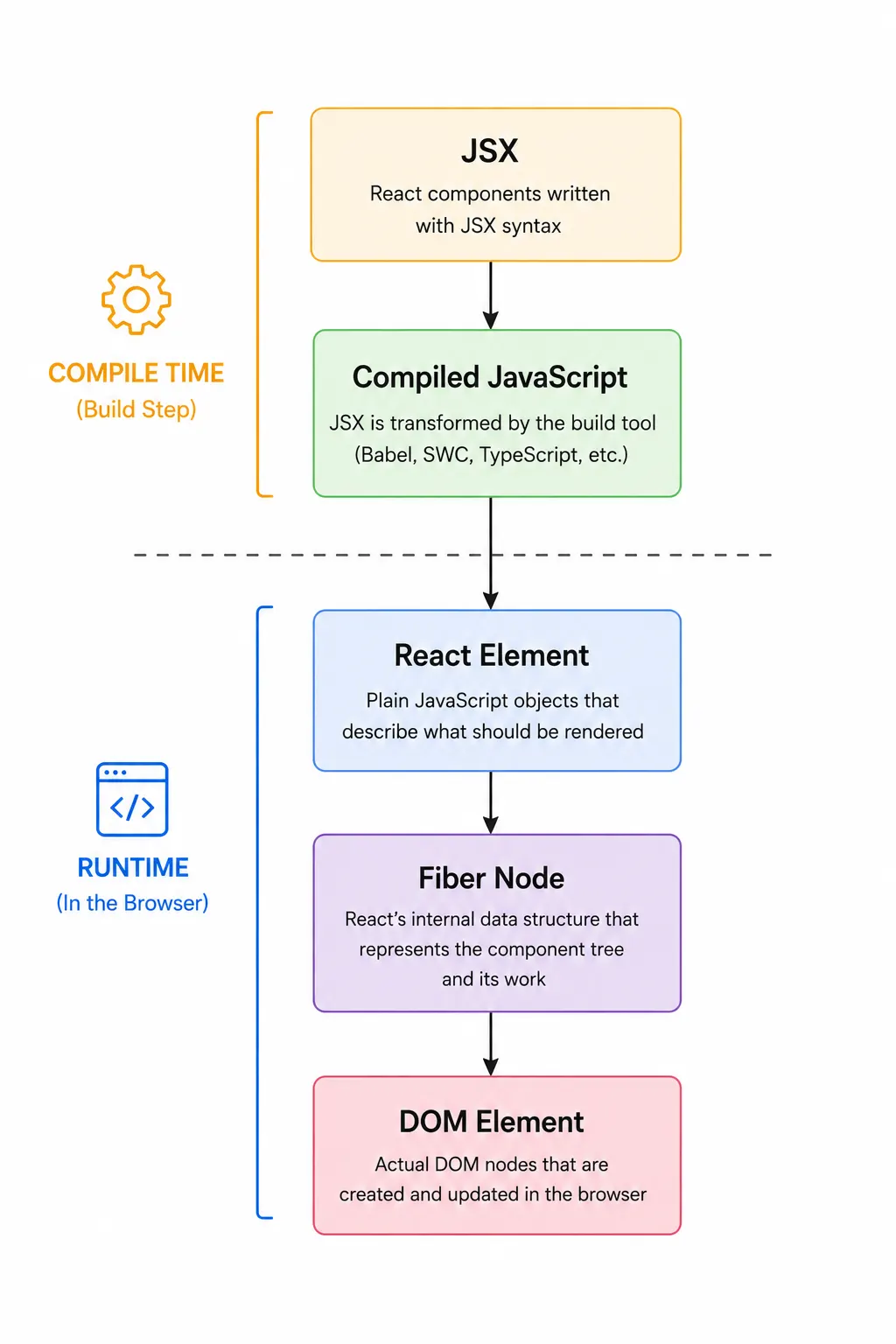 The Journey from JSX to the DOM.
1. A Simple React Component Tree
Let’s start with a simple React component tree:
import { useState } from 'react';

function App() {
  const [name, setName] = useState('World');
  return (
    <main>
      <Greeting name={name} />
    </main>
  );
}

function Greeting({ name }) {
  return <h1>Hello {name}</h1>;
}
Here we have two components, App and Greeting. Greeting renders a “Hello” message with a dynamic name value appended. App calls Greeting, passing in the name value from its useState hook.
2. Turning the JSX Into JavaScript
The JSX returned by React components cannot be read by browsers. So, our JSX has to be converted to plain JavaScript.
Your app’s build tooling handles this transformation automatically. Tools such as Babel, SWC, or the TypeScript compiler rewrite each JSX element into a call to React’s JSX runtime. For example, Babel turns the Greeting component above into JavaScript that looks like this:
import { jsxs as _jsxs } from "react/jsx-runtime";

function Greeting({ name }) {
  return _jsxs("h1", {
    children: ["Hello ", name],
  });
}
3. Creating React Elements
At runtime, React calls each component function, which causes each component’s internal jsxs() call to execute. This produces a subtree of React Elements representing the HTML elements and child components described by the component's JSX.
A React Element is a lightweight JavaScript object that describes what should appear on the screen. It contains a type, which is either an HTML tag like h1 or a reference to a React component function such as Greeting, along with the element's props and other metadata.
React Elements are descriptions of the UI, not actual DOM nodes. As React renders each component, it creates React Elements describing what that component should render. Below are simplified examples of some of the React Elements created while rendering our component tree:
// Greeting Component
{
  type: Greeting,
  props: {
    name: "World"
  }
}

// h1 Element
{
  type: "h1",
  props: {
    children: ["Hello ", "World"]
  }
}
Observe that we have React Elements representing both function components (Greeting) and HTML Elements (h1).
4. A Simplified Rendering System
Next, let’s look at what the simplest possible rendering system might look like, with zero optimizations. This will help us understand the basic concept of evaluating components and translating the React Elements they return into a DOM tree. Later, we will use this system as a backdrop to explain the optimizations React puts in place in its real rendering system.
Given a root React Element and a root DOM container, our hypothetical renderer could recursively create the corresponding DOM nodes for the entire tree:
function render(element, container) {
  // A function type represents a React function component.
  if (typeof element.type === "function") {
    const childElement = element.type(element.props);
    render(childElement, container);
    return;
  }

  // A string type represents a DOM node.
  const domNode = document.createElement(element.type);

  const children = element.props.children ?? [];
  const childArray = Array.isArray(children)
    ? children
    : [children];

  childArray.forEach((child) => {
    render(child, domNode);
  });

 // Handling of text nodes omitted for brevity...

  container.appendChild(domNode);
}
There are two cases to handle:
- Function types represent React function components. Call the component with its props, which returns another React Element, and then recursively render that element.
- String types such as main or h1 represent DOM nodes. Create the corresponding DOM node, recursively render its children into it, and then append it to the container.
Although greatly simplified, this demonstrates the core idea behind React’s rendering process: a React Element contains enough information for a renderer to recursively traverse the element tree, evaluate components, and construct the corresponding DOM tree.
5. Fiber, An Introduction
Our simple renderer has some drawbacks.
The first is responsiveness. In a synchronous renderer, once rendering begins, it continues until the entire component tree has been processed. If rendering a large tree takes a noticeable amount of time, the browser cannot respond to user input until that work finishes, making the application feel sluggish.
The second is efficiency. Our simple renderer recreates the whole DOM tree on every update. But most updates affect only a small portion of the UI. Changing the name prop in our example should only update the text inside the <h1>, not recreate every DOM node in the application. A practical renderer therefore needs a way to determine exactly what changed and apply only the necessary DOM mutations.
React’s Fiber architecture solves both of these problems. It breaks rendering work into small units that can be paused and resumed, so a render doesn’t block the UI. It also uses efficient data structures to reconcile one render with the next, to apply the minimal set of DOM changes necessary.
Modern React represents the rendered UI using a tree of Fiber nodes. Each Fiber node (usually referred to simply as a “Fiber”) corresponds to a React component, an HTML element, or a text node. A Fiber stores information about the part of the UI it represents, including its type, props, and additional metadata used during rendering.
A Fiber also contains references to its child, sibling, return, and alternate Fibers. The child pointer references the Fiber's first child, sibling points to the next sibling, and return points to the parent Fiber. Together, these pointers allow React to efficiently traverse the Fiber tree in both directions during rendering. The alternate field points to the corresponding Fiber in the other tree and is used during reconciliation.
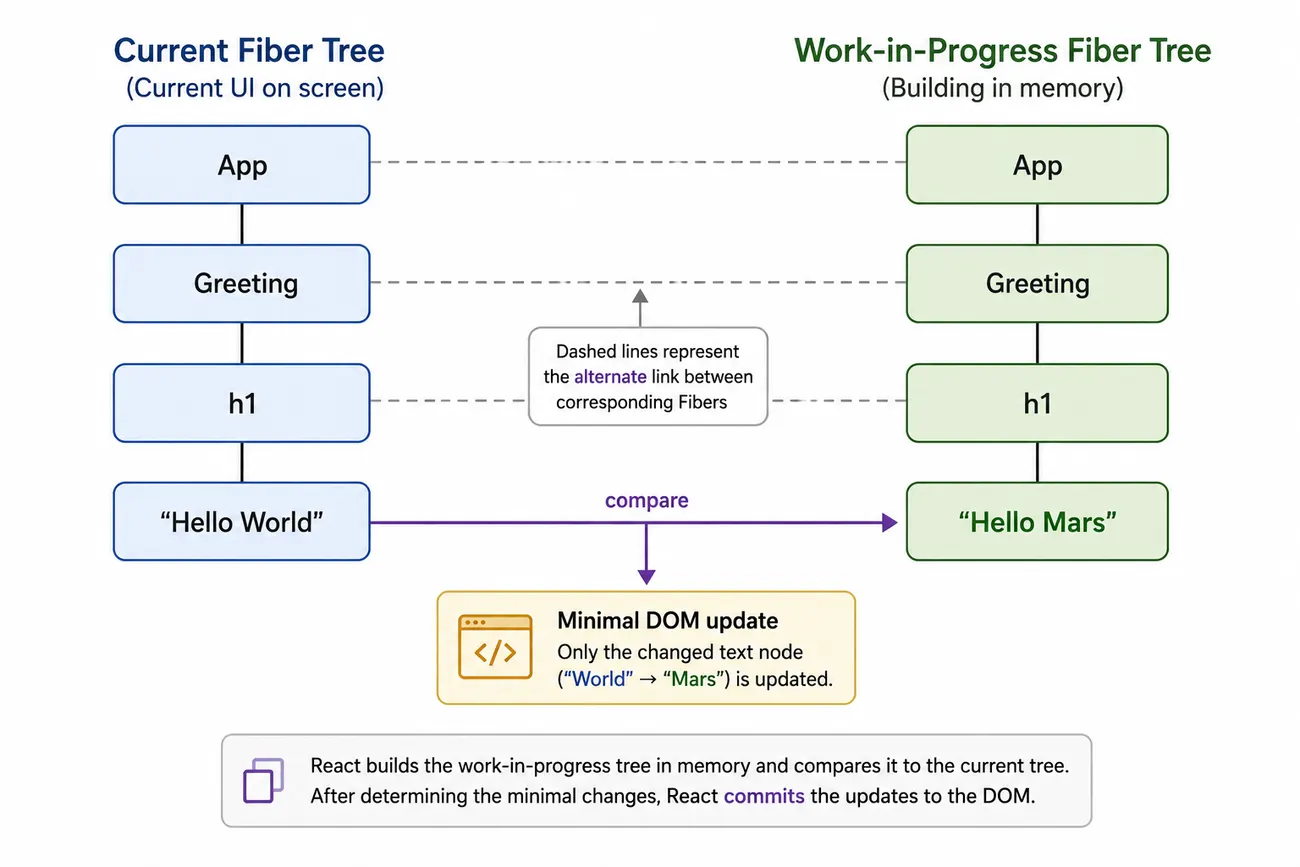
The alternate field is key to the reconciliation process we will discuss below. Briefly: React compares the currently-rendered Fiber tree to a new work-in-progress tree on every update. Every Fiber in both trees contains a pointer to its corresponding Fiber in the other tree, which is used to compare the two nodes during reconciliation to determine what changes need to be made to the DOM. (We will explore this in detail later on in the article.)
A simplified Fiber for our Greeting component might look like this:
{
  type: Greeting,
  props: {
    name: "World"
  },
  child: ...,
  sibling: null,
  alternate: null,
}
React Elements and Fiber nodes are closely related, but they serve different purposes.
React Elements are immutable descriptions of what a component wants to render. Every time a component function runs, it creates a new set of React Elements representing the desired UI.
Each Fiber corresponds to a React Element from the current render, but it also stores the bookkeeping React needs to efficiently update the UI, including references to related Fibers, pending work, update priorities, and the corresponding DOM node. (We’ll examine each of these in detail throughout the rest of this article.)
Put another way, React Elements describe what the UI should look like, while Fiber nodes keep track of everything React needs to turn those descriptions into an efficient rendering system.
6. Interruptible Rendering: The Work Loop
Our simplified renderer processed the entire component tree through a single recursive function call. Once rendering began, it couldn’t be paused until the entire tree had been processed.
When the whole tree must be processed at once, it can block the main browser thread long enough to freeze the UI. For example, if React is in the middle of rendering a long list, and the user types into a search input, there could be a several-second delay before the user sees the typed text appear in the input.
React introduced the concept of the work loop to address these types of issues.
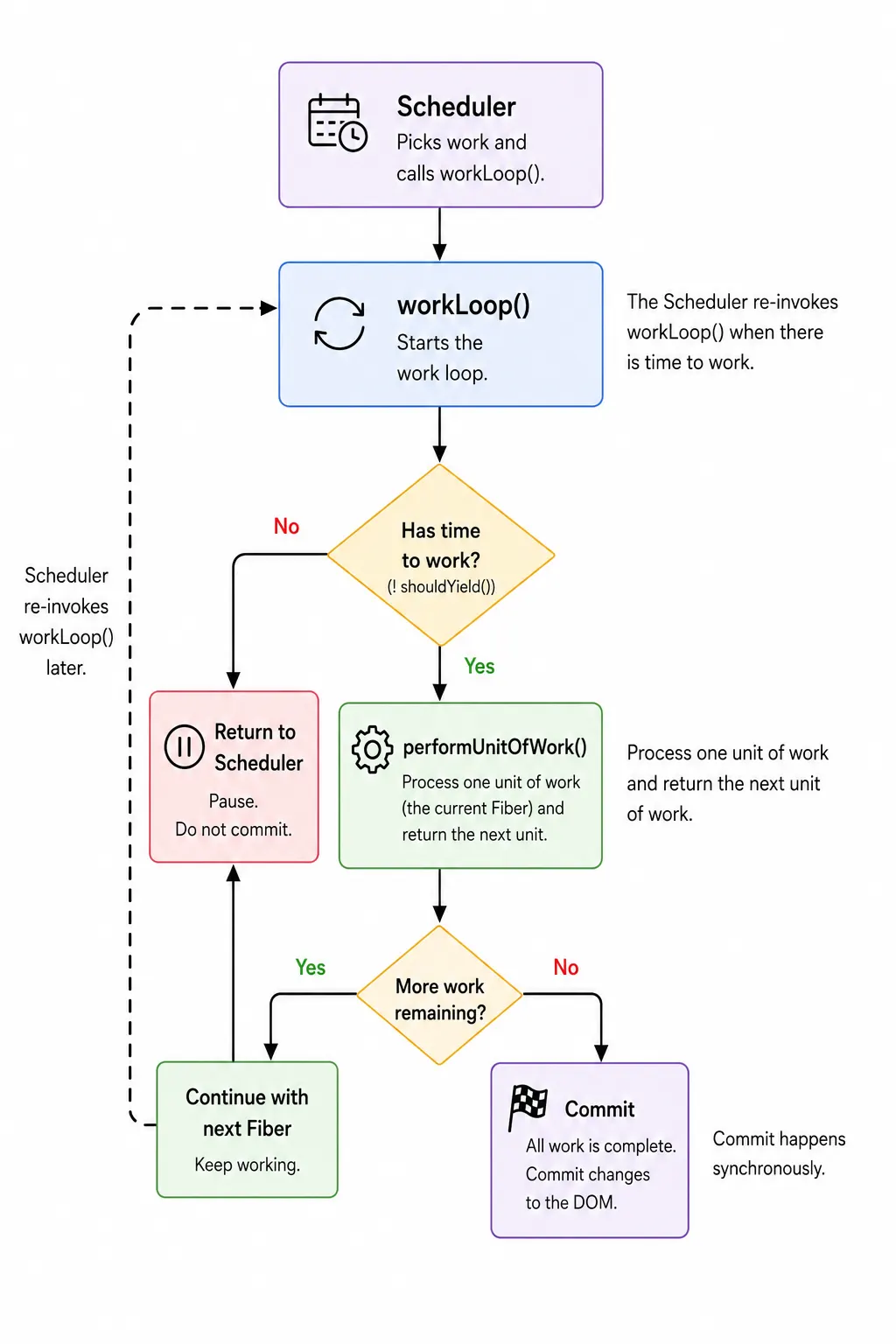
React treats each Fiber as an individual unit of work. Instead of traversing the entire tree in one go, React processes one Fiber at a time. This architecture makes it possible for React to pause rendering between Fibers, return control of the main thread, and resume rendering later.
Here is a simplified version of the work loop:
let workInProgress = rootFiber;

function workLoop() {
  while (
    workInProgress !== null &&
    !shouldYield()
  ) {
    workInProgress =
      performUnitOfWork(workInProgress);
  }

  if (workInProgress !== null) {
    return workLoop;
  }

  commitRoot();
  return null;
}

scheduleCallback(workLoop);
The work loop works in concert with React’s Scheduler, which is a separate package that decides when a specific render should start and when it should yield.
First, React stores the Fiber currently being processed in workInProgress. This variable is initialized with the root of the new Fiber tree.
React then uses scheduleCallback() to kick things off. This function is part of the Scheduler's API and allows React to hand workLoop off to the Scheduler, which determines when the callback should run.
Once the Scheduler invokes workLoop(), it begins processing Fiber nodes one at a time. Each call to performUnitOfWork() processes the current Fiber and returns the next Fiber that should be processed, which is stored in workInProgress.
Before processing the next Fiber, the work loop checks the Scheduler-provided shouldYield() function. If shouldYield() returns true, React exits the loop; otherwise, it processes the next Fiber.
Once the inner while loop exits, workLoop() examines workInProgress. If it still contains a reference to a Fiber, then workLoop knows the render has been paused before completing. In this case, workLoop() returns a reference to itself, which signals to the Scheduler that there is more work to process later.
If workInProgress is null, then workLoop() has finished processing the Fiber tree. In that case, workLoop calls commitRoot() and then returns null, indicating to the Scheduler that the task is complete.
The details of what happens when each node is processed are handled inside performUnitOfWork. Here is a simplified version of that function:
function performUnitOfWork(workInProgressFiber) {
  const currentFiber = workInProgressFiber.alternate;

  const next = beginWork(
    currentFiber,
    workInProgressFiber
  );

  if (next !== null) {
    return next;
  }

  return completeUnitOfWork(workInProgressFiber);
}
performUnitOfWork() processes the current Fiber, determines which Fiber should be processed next, and returns that Fiber to the work loop so it can decide whether to continue rendering or yield.
Each Fiber is processed in two stages. Together, they perform a depth-first traversal of the Fiber tree. React first calls beginWork() as it walks down the tree, where it allocates Fiber objects for the children of the current Fiber.
If beginWork() has no child Fiber to process, performUnitOfWork() hands control to completeUnitOfWork(). This helper walks back up the tree, calling completeWork() on each completed Fiber, which prepares the actual DOM updates.
7. Reconciliation
We’ve seen that React performs a depth-first traversal of the Fiber tree, processing one Fiber at a time, checking after processing each Fiber to see if it needs to pause work and yield control of the main thread. Now it’s time to look at what React is actually doing when it processes each node.
Every time an update occurs, React calls the affected component functions again, producing a new set of React Elements. React compares the new set of elements with what is currently rendered to the DOM and computes the minimal set of DOM changes required to update the interface. This process is called reconciliation.
To perform that comparison, React maintains two versions of the Fiber tree:
- The current Fiber tree, representing the UI currently displayed.
- The work-in-progress Fiber tree, which React builds during reconciliation.
// Current Fiber tree
const currentRoot = {
  type: App,
  child: {
    type: Greeting,
    props: {
      name: "World",
    },
  },
};

// Work-in-progress Fiber tree
const workInProgressRoot = {
  type: App,
  child: {
    type: Greeting,
    props: {
      name: "Mars",
    },
  },
};
As React builds the work-in-progress Fiber tree, it compares each new React Element with the corresponding Fiber from the currently-rendered tree.
When the work loop reaches a Fiber, it calls beginWork(), whose main purpose is to determine which child elements should be rendered:
function beginWork(currentFiber, workInProgressFiber) {
  // Determine the children this Fiber should render.
  const newChildren =
    typeof workInProgressFiber.type === "function"
      ? workInProgressFiber.type(workInProgressFiber.props)
      : workInProgressFiber.props.children;

  // Compare the new children with the previous render.
  reconcileChildren(
    workInProgressFiber,
    currentFiber?.child ?? null,
    newChildren
  );

  return workInProgressFiber.child;
}
If the current Fiber represents a React component, the Fiber’s type will be a function (a reference to the component function itself). So, the children can be obtained by calling the component function. Otherwise, the Fiber represents a DOM node, in which case the children are available on the element's props.
beginWork() then hands these child elements off to reconcileChildren(), which decides which existing Fibers can be reused and which new Fibers must be created. reconcileChildren()’s job is straightforward:
- Reuse existing Fibers whenever possible.
- Create new Fibers when necessary.
- Delete Fibers that no longer exist.
A simplified version looks like this:
function reconcileChildren(
  returnFiber,
  currentFirstChild,
  newChildren
) {
  let oldFiber = currentFirstChild;

  for (const newChild of newChildren) {
    if (
      oldFiber &&
      oldFiber.key === (newChild.key ?? null) &&
      oldFiber.type === newChild.type
    ) {
      reuseFiber(oldFiber, newChild);
    } else {
      createFiber(newChild);
    }

    oldFiber = oldFiber?.sibling ?? null;
  }
}
reconcileChildren iterates over the new child elements one at a time, while maintaining a reference to the corresponding Fiber from the current tree so it can compare each new React Element with the existing Fiber.
For each new element, it first asks whether it can reuse the current Fiber. This will be true if the new Element and the existing Fiber have the same type and key. If it can, it reuses the existing Fiber and advances to its sibling. This is the “happy path.” If it can’t reuse the existing node, it creates a new Fiber for the element.
Once reconcileChildren has processed all of the new elements, any remaining Fibers from the current tree correspond to components or DOM nodes that no longer exist, so it marks them for deletion.
Note: React’s real implementation is considerably more sophisticated than this. It uses a two-pass algorithm to efficiently handle items that move within a list. It also reuses an existing Fiber’s alternate as the work-in-progress Fiber rather than creating a new Fiber. This allows React to recycle the same two Fiber trees across renders, a technique known as double buffering. However, the simplified version above captures the central idea.
On the walk back up the tree, React calls completeWork() on each Fiber, where it records the work that will need to be performed during the commit phase by adding flags to the completed Fibers. These flags indicate operations such as inserting a new DOM node, updating an existing one, or deleting a node that is no longer needed.
function completeWork(workInProgressFiber) {
  const currentFiber = workInProgressFiber.alternate;

  if (currentFiber === null) {
    // New Fiber -> create a DOM node.
    workInProgressFiber.stateNode = document.createElement(
      workInProgressFiber.type
    );
  } else {
    // Existing Fiber -> reuse the DOM node.
    workInProgressFiber.stateNode = currentFiber.stateNode;

    // Mark that the DOM will need updating.
    if (currentFiber.props !== workInProgressFiber.props) {
      workInProgressFiber.flags |= Update;
    }
  }
}
8. Committing to the DOM
The entire process we’ve learned about so far takes place without touching the live DOM. React builds a new Fiber tree piece by piece in memory, while the user continues interacting freely with the current UI.
Only once the new Fiber tree is complete does React commit the changes to the DOM. This is called the commit phase.
Unlike the render phase we’ve discussed so far, the DOM mutations performed during the commit phase are synchronous and cannot be interrupted. This is because committing to the DOM must be an all-or-nothing endeavor; committing only part of the DOM would result in an inconsistent UI.
Committing to the DOM looks something like this:
function commitWork(fiber) {
  // Remove children marked for deletion during reconciliation.
  if (fiber.deletions !== null) {
    fiber.deletions.forEach(commitDeletion);
  }

  // Commit children first, walking the sibling list.
  let child = fiber.child;
  while (child !== null) {
    commitWork(child);
    child = child.sibling;
  }

  // Insert newly-created DOM nodes.
  if (fiber.flags & Placement) {
    const parentDom = getParentDomNode(fiber);
    parentDom.appendChild(fiber.stateNode);
  }

  // Update existing DOM nodes.
  if (fiber.flags & Update) {
    updateDom(
      fiber.stateNode,
      fiber.alternate.props,
      fiber.props
    );
  }
}
The commitWork() function performs a depth-first traversal of the tree. If it’s adding a new DOM node, it appends the new node to the parent node. If it’s updating an existing DOM node, it performs the necessary updates to the existing DOM node’s properties.
Note: _The real React implementation divides the commit phase into multiple passes. Among other things, this ensures that all DOM mutations are complete before layout effects (__useLayoutEffect) run, while passive effects (_useEffect) are scheduled separately afterward. I am intentionally keeping hooks out of the discussion here to keep the explanations and code examples focused.
9. Prioritizing Updates
We’ve seen that Fiber breaks rendering into small units of work. This architecture makes interruptible rendering possible_._ Now, we will explore how React decides when to interrupt rendering by assigning relative priorities to updates.
React assigns a priority to each update it processes. If an update with a higher priority comes in while an update with a lower priority is being processed, React can pause the lower-priority update, process the higher-priority update, and then either resume processing the lower-priority update or throw it away. This is the foundation of React’s concurrent rendering model.
React manages the relative priority of successive updates using the concept of lanes. React assigns a lane to every update it processes, and each lane has a priority relative to the other lanes. Lanes are represented as 31-bit integers that look something like this (depending on which version of the React source code you look at):
type Lanes = number;
type Lane = number;

const SyncLane: Lane             = 0b0000000000000000000000000000001;
const InputContinuousLane: Lane  = 0b0000000000000000000000000000100;
const DefaultLane: Lane          = 0b0000000000000000000000000010000;
const TransitionLane1: Lane      = 0b0000000000000000000000001000000;
const IdleLane: Lane             = 0b0100000000000000000000000000000;
The lanes above are listed from highest priority to lowest priority.
- SyncLane is the highest-priority lane and is used for updates that should be reflected on screen immediately, such as updates triggered by user interactions like clicking a button or typing into an input.
- InputContinuousLane is used for continuous interactions such as scrolling or dragging.
- Most ordinary state updates are assigned to DefaultLane.
- Updates wrapped in startTransition() are assigned to one of the TransitionLanes, allowing them to be deferred in favor of more urgent work. (If you’re unfamiliar with startTransition(), no worries, we will discuss it in our example below.)
- Finally, IdleLane is reserved for background work that can wait until the browser has no more important tasks to perform, such as prefetching content.
Our previous discussion of the work loop omitted one important detail to keep the explanation simple, but we will need to address it now. There are actually two versions of workLoop(): workLoopSync() and workLoopConcurrent().
React processes SyncLane, InputContinuousLane, and DefaultLane updates synchronously, without pausing mid-render. These higher-priority updates are never interrupted. When processing updates for these lanes, React calls workLoopSync(). This function is quite straightforward, as it doesn’t have to worry about the nuances of pausing and yielding to the browser:
function workLoopSync() {
  while (workInProgress !== null) {
    workInProgress = performUnitOfWork(workInProgress);
  }
}
The other lanes are processed with workLoopConcurrent. This is the asynchronous work loop we discussed earlier, which stops after processing each unit of work to determine if it needs to yield.
So, lower-priority updates are interruptible, while higher-priority updates are not.
The canonical example used to illustrate concurrent rendering is a user typing into a search box while React is in the middle of rendering a large list. Here is a React component that renders a list of results filtered by the value the user types into an input element.
function Search() {
  const [query, setQuery] = useState("");

  function handleChange(e) {
    setQuery(e.target.value);
  }

  const results = filter(products, query);

  return (
    <>
      <input value={query} onChange={handleChange} />
      <Results items={results} />
    </>
  );
}
Assume the user begins typing in the input. Each keystroke invokes handleChange(), which calls setQuery() and schedules a new update.
Because setQuery() is triggered by a user action, React treats the update as urgent and schedules it in SyncLane. The corresponding UI updates—updating the search input text and updating the results list — are rendered using workLoopSync().
If the user types another character while this render is still in progress, React cannot display that new input until the current synchronous render has finished and been committed to the DOM.
Performing reconciliation on the filtered list could take a noticeably long time if the list is large enough. If the browser has to wait until this render is complete to process the next keystroke, the input will feel sluggish.
Now let’s wrap the results in a startTransition():
import { useState, startTransition } from "react";

function Search() {
  const [query, setQuery] = useState("");
  const [filterQuery, setFilterQuery] = useState("");

  function handleChange(e) {
    const value = e.target.value;

    // Urgent: update the input immediately.
    setQuery(value);

    // Non-urgent: update the filtered results later.
    startTransition(() => {
      setFilterQuery(value);
    });
  }

  const results = filter(products, filterQuery);

  return (
    <>
      <input value={query} onChange={handleChange} />
      <Results items={results} />
    </>
  );
}
An update wrapped with startTransition() is marked as lower priority and scheduled in a TransitionLane.
Now, when the user types into the input, the call to setQuery(), which controls the display of the text in the search input, is still treated as an urgent update and assigned to SyncLane. However, the call to setFilterQuery(), which controls the display of the results list, is assigned to a TransitionLane, marking it as lower priority.
Rendering the results list now has lower priority than rendering the search input. If React is in the middle of rendering the results list, and the user types into the search input, the search input update will take priority over the rendering of the list. React will pause rendering the list and process the higher-priority update to the search input.
Since the results list is dependent on the value the user types in the search input, React will throw away the partially-completed results list render and start fresh with a new render once the SyncLane update is processed.
Note: React does not always discard a paused render. If a newer update does not invalidate the work already in progress, React can resume the paused render instead of starting over from scratch.
10. How Lanes Are Represented in Fiber
We know that every update is assigned a lane representing its priority. When an update is scheduled, React first records that lane on the Fiber associated with the component receiving the update. React then walks up the Fiber tree, marking each ancestor node with information indicating that its subtree contains pending work at that priority.
Here is a simplified example of that:
function scheduleUpdateOnFiber(fiber, lane) {
  // Record the update's priority.
  fiber.lanes |= lane;

  let parent = fiber.return;

  // Propagate the lane upward so each ancestor knows
  // that its subtree contains pending work for this lane.
  while (parent !== null) {
    parent.childLanes |= lane;
    parent = parent.return;
  }

  // The root now knows that work at this priority is pending.
  const root = getRootForFiber(fiber);
  root.pendingLanes |= lane;

  ensureRootIsScheduled(root);
}
A Fiber’s lanes field records pending work scheduled directly on that Fiber, while its childLanes field records pending work s_omewhere within its subtree_.
Because every pending update’s lane is propagated all the way to the root, the root contains a complete summary of which lanes are pending. React can then inspect the root’s pendingLanes, select the highest-priority lanes that still contain work, and schedule a callback with the Scheduler to process them.
When processing each Fiber, React compares the lanes currently being rendered with the lanes and childLanes stored on the Fiber. If a subtree contains no work for any of the current lanes, React can skip traversing that subtree entirely. Otherwise, React continues walking into the subtree and performs reconciliation as usual.
Skipping unrelated subtrees is a key performance optimization. Rather than traversing every branch of the tree on every render, React can avoid work in branches that contain no pending updates for the current lanes.
Note: To keep this article focused, we’ve intentionally left out several important parts of React’s rendering system, including refs, Context, Suspense, error boundaries, hydration, and the details of how React runs effects. Each of these builds on the same Fiber architecture we’ve explored here, but covering them properly would require an article of its own.
Conclusion
Fiber is a sophisticated system that evolved over many years through the work and experimentation of many talented software engineers, all focused on making rendering faster. Here we explored the most impactful features of Fiber: its non-blocking work loop, its smart reconciliation algorithm, and how it prioritizes updates and performs concurrent rendering to keep the UI responsive.
If you made it all the way to the end of this article, congratulations. We went fairly deep into the technical details of how React renders components. You should now have a much stronger mental model of how React transforms components into a user interface in a way that feels fast and responsive to the user. I hope this deeper understanding helps you architect, build, optimize, and debug React applications more effectively.
Happy coding!
Originally published on Medium.